Mobile App v1.2.12 — Coach's Notes, Generate WOD & Favorites
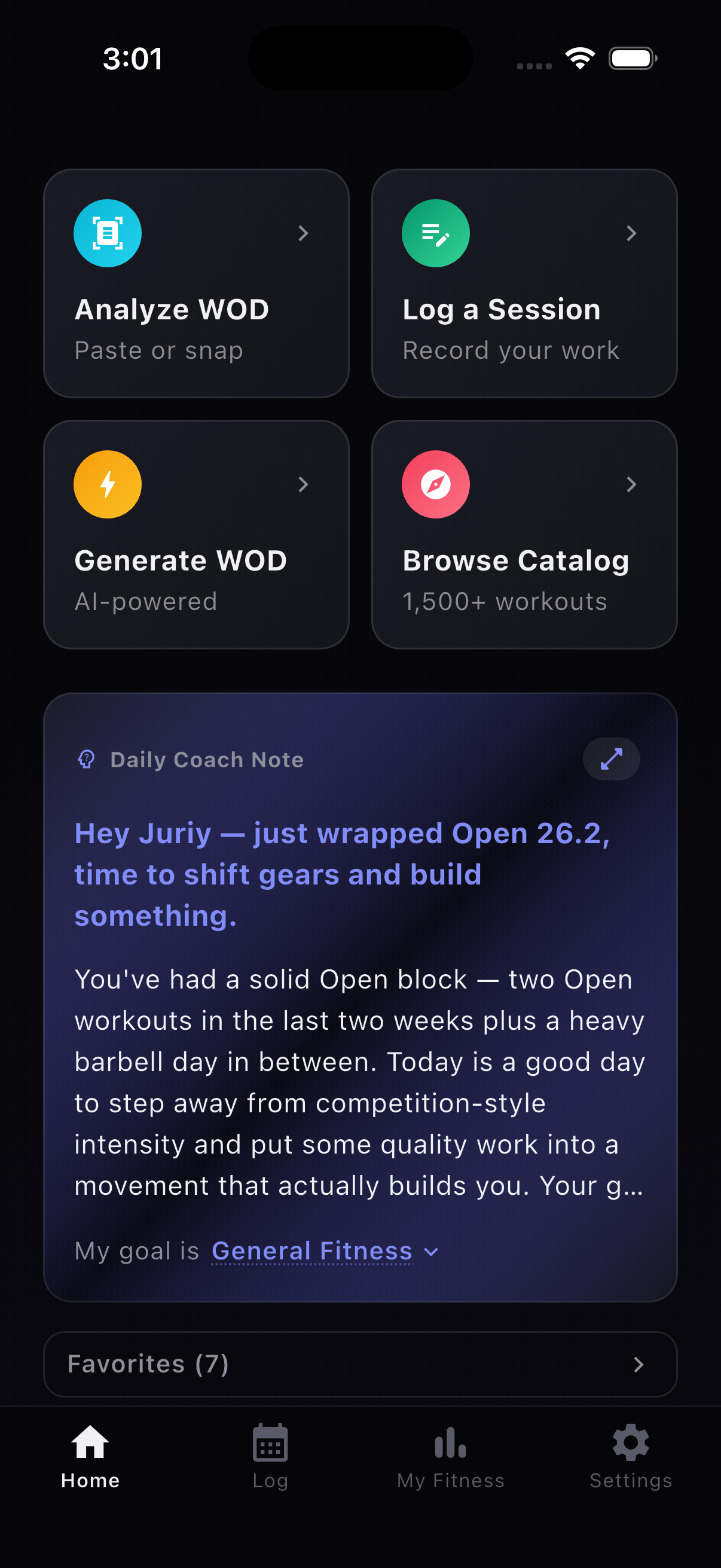
The Home screen got a complete rethink. Instead of jumping straight into workouts, you now open to four quick-action tiles — Analyze WOD, Log a Session, Generate WOD, and Browse Catalog — plus Coach's Notes, an AI-powered daily briefing that knows your goals, recent training, and what you should focus on next.
Features
- AI Coach's Notes — a daily briefing on your Home screen that knows your goals and recent training history. It tells you what to focus on today.
- Generate WOD — pick your skills, set a time domain, and get a ready-to-go workout in seconds. Save it or log it immediately.
- Favorites screen — save workouts you love and access them from a dedicated screen with pull-to-refresh.
- Benchmark chart improvements — gender toggle and a personal position marker so you can see where you stack up.
- Tappable movement names during logging — tap any movement to jump to its detail page.
- CrossFit Open 26.1 workout data added.
Improvements
- Home screen restructured with a coaching-first design
- Pull-to-refresh on Calendar view
- Generated and custom WOD logging routes through session edit
- Favorites actions unified across web and Flutter
Fixes
- Distance-based sets now save correctly with default time values
- Movement input formatting normalized across logging flows
- Home tab restored in bottom navigation after restructuring
- Open 26.1 prescribed box movements corrected