Read your training month beyond the workout count
Use PRzilla's monthly report to review training emphasis, movement frequency, and external load—and understand what each number can actually tell you.
Counting training days tells you how often you showed up. It leaves another question open: what did those sessions contain?
PRzilla's monthly report brings several views of your recorded training together. Open Profile > Monthly reports and choose a completed month. You can review the training qualities your WODs emphasized, the movements that appeared often, and the external load you moved, where your history supports those sections.
Each view measures something different. Reading the label is as useful as reading the number.
Training qualities describe the work you chose
The Training qualities section summarizes the classified demands of your completed WODs. Its scores describe the workouts' emphasis on qualities such as strength and power.
Those qualities can overlap. A workout can emphasize both strength and power, so the scores are not slices of a pie that must add up to 100 percent. They are also not percentages of your training time.
A higher strength-emphasis score means the classified WODs leaned more heavily toward strength. It does not establish that your strength improved by that amount, or place you at a percentile among other athletes.
Where there is enough classified history, the report compares the month with your recent norm. That helps answer a practical question: did the kind of work you logged change? Demonstrating an improvement in performance still requires looking at the results themselves.
For the separate calculation that uses scored benchmark performances, see how PRzilla calculates Fitness Level.
Most practiced counts sessions
Under Movement patterns, the Most practiced list ranks movements by how many separate sessions included them.
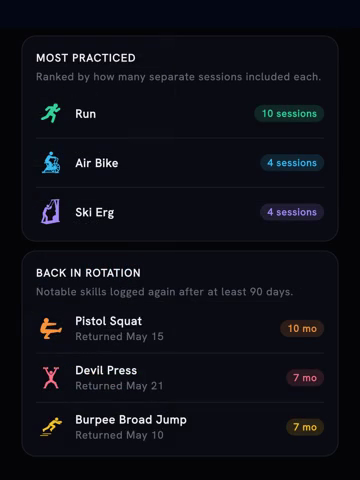
The May example report ranks movements by sessions. These are example-report figures, not targets for your own month. Frame from the published July report video.
That is a view of frequency. A movement can rank highly because it appeared regularly, even if another movement accounted for more total reps or more weight.
Use the list to check what kept recurring. If you expected a particular movement to be a regular part of the month, the list and its session counts give you something concrete to compare with that expectation.
Frequency also differs from a personal record. Repeating a movement across the month does not necessarily produce a new heaviest set or longest unbroken effort. Those results belong in the movement's records.
External load moved counts reps times weight
The External load moved section totals recorded external load using reps times weight. Its breakdown shows which movements contributed most.
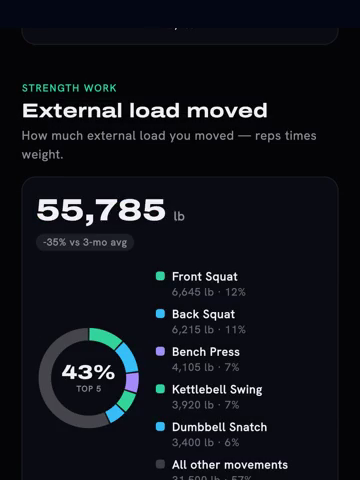
The same example month shows reps times weight and the contributing movements. Its decrease is shown as recorded, without treating higher volume as an automatic improvement.
This is useful for understanding the amount and composition of your loaded work. It is not a calorie estimate or a direct measure of strength gained.
The total can rise because you logged more sessions, did more reps, used more weight, or changed the mix of movements. Look at the contributing movements before deciding what the change means.
It also should not stand in for the whole month. Bodyweight work and other training can matter to your history without contributing external load in the same way.
Start with the question you wanted the month to answer
Before opening the report, choose a question: did a movement appear regularly, did the workout mix change, or where did the loaded volume come from?
Then use the relevant section and return to the recorded sessions when you need the detail. This keeps a large total from becoming a goal just because it is large.
Reports cover completed months with enough recorded activity. Individual sections also depend on the detail available; a sparse history will not support every comparison.
Free accounts can read the most recent eligible month's report as a sample, without the AI coach read. Other months have previews. Pro provides full report access, including the coach read when available.
Open Monthly reports from your profile and choose the most recent eligible month to start reading.