Find your last workout without remembering its name
Search your PRzilla log by movement, notes, set scheme, or weight. Find an old session, then check the details that matter for today's workout.
You remember doing the movement. You remember writing a note about the weight. You do not remember whether the session was called "Strength," the name of a benchmark, or nothing at all.
In PRzilla, open Log, switch to List, and use Search your log. Search looks inside your recorded sessions, including movement names, workout descriptions, notes, sets, and weights. Results appear with the most recent sessions first.
Search for the movement
A movement can appear as its own entry or inside a WOD. Searching its name can find both, including movements in complexes and supersets.
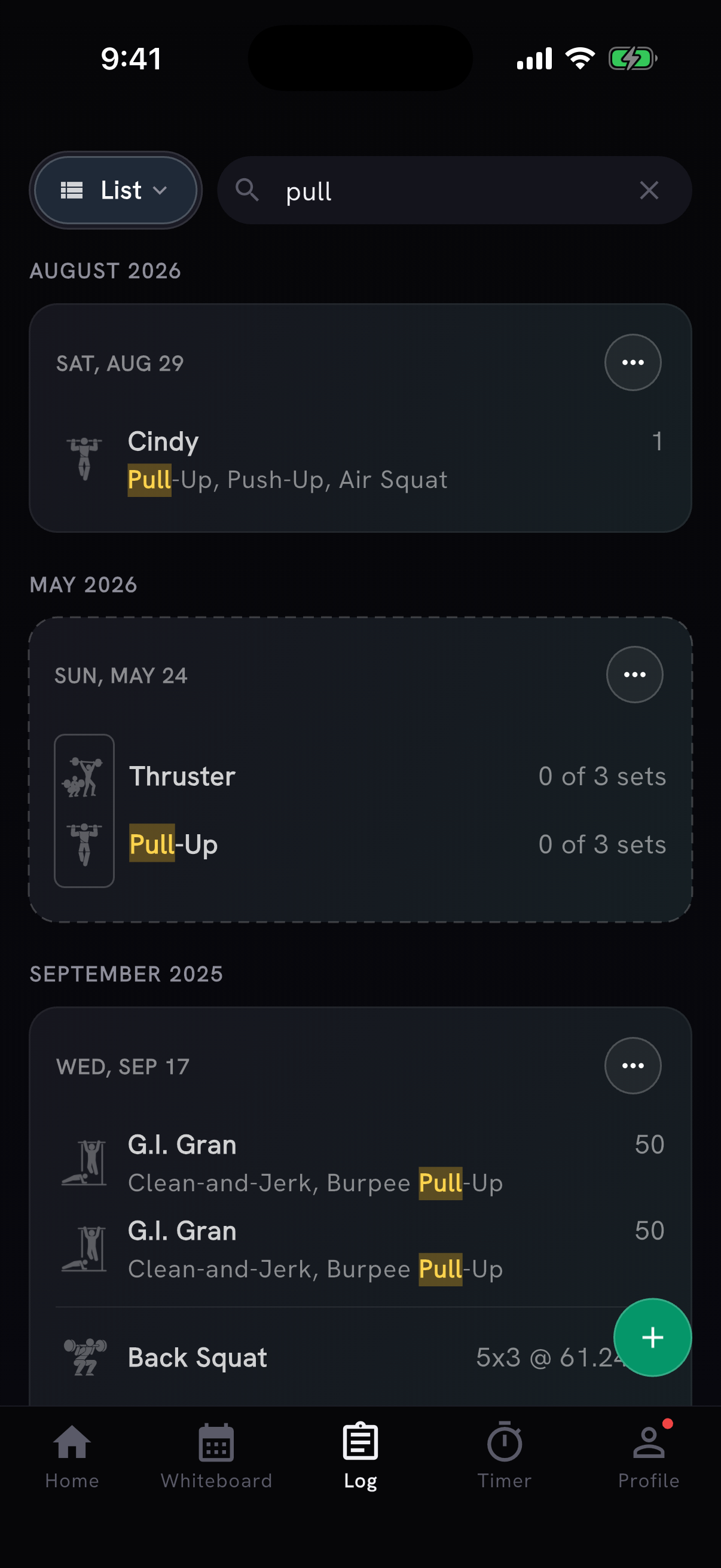
Searching for "pull" finds matching movement text inside sessions, including Cindy. Open a result to check the actual sets and score.
Common movement aliases, abbreviations, and plurals are supported too. You can try HSPU when you are looking for handstand push-ups. You do not need to reconstruct the full workout title first.
Open a matching session to see what you recorded. The movement's appearance is the clue; the result and notes explain the attempt.
Search for a note or a set scheme
Notes are searchable alongside workout and movement names. If you wrote paused, that word can help you find the session later. Search can also find a recorded set scheme such as 3x5; 3 x 5 works too.
You can combine details. A movement name plus a distinctive note narrows the list to sessions containing both.
That makes a short, specific note useful twice: once when you record it, and again when you are trying to find the effort. "Paused" or the name of a substitution can be easier to search for than a generic note about how the day felt.
Search only has the record you saved. If a substitution matters for the next attempt, put it in the movement details or notes when you log it.
Add the unit when you mean a weight
The following are example searches, not results from an athlete's account:
| Search | What it helps find |
|---|---|
60kg | A matching recorded load, with kilograms made explicit |
60 kg | The same weight search, with a space |
95lb | A load entered with pounds made explicit |
3x5 | A matching recorded set scheme |
Weight searches account for pounds and kilograms in recorded load fields. A bare number is broader: it can match reps, rounds, or a number in the notes as well as a weight.
There is one detail to remember when combining terms. Search matches the session, so bench press 60kg can return a session containing bench press and a matching weight elsewhere in that session. Open the result and check which movement and set used the load before taking it as your previous bench-press weight.
Use the result as context for the next attempt
Once you find the session, check its reps, load, scaling, and notes together. An old weight on its own may leave out the detail you were looking for: fewer reps, a different movement variation, or a set you did not finish.
For comparisons across attempts at one named workout, its history is useful. For finding a movement across many different sessions, log search gives you another route into the same record.
Try it with a movement on your next training day. Open Log > List, enter the detail you remember, and read the original session before deciding what the result tells you.